Most of us think of a text file as the safest thing on a computer. It can't run, it can't install anything, and your operating system doesn't even ask before saving one. This week a security firm showed why that assumption breaks the moment an AI coding agent is in the room.
A plain Markdown file, dropped into someone's Downloads folder by a website, told OpenAI's Codex to install malware, and the agent did it. A similar file got Anthropic's Claude Code to hand over its own login token. The agents did exactly what they are built to do: read the instructions file in their folder and follow it.
What happened
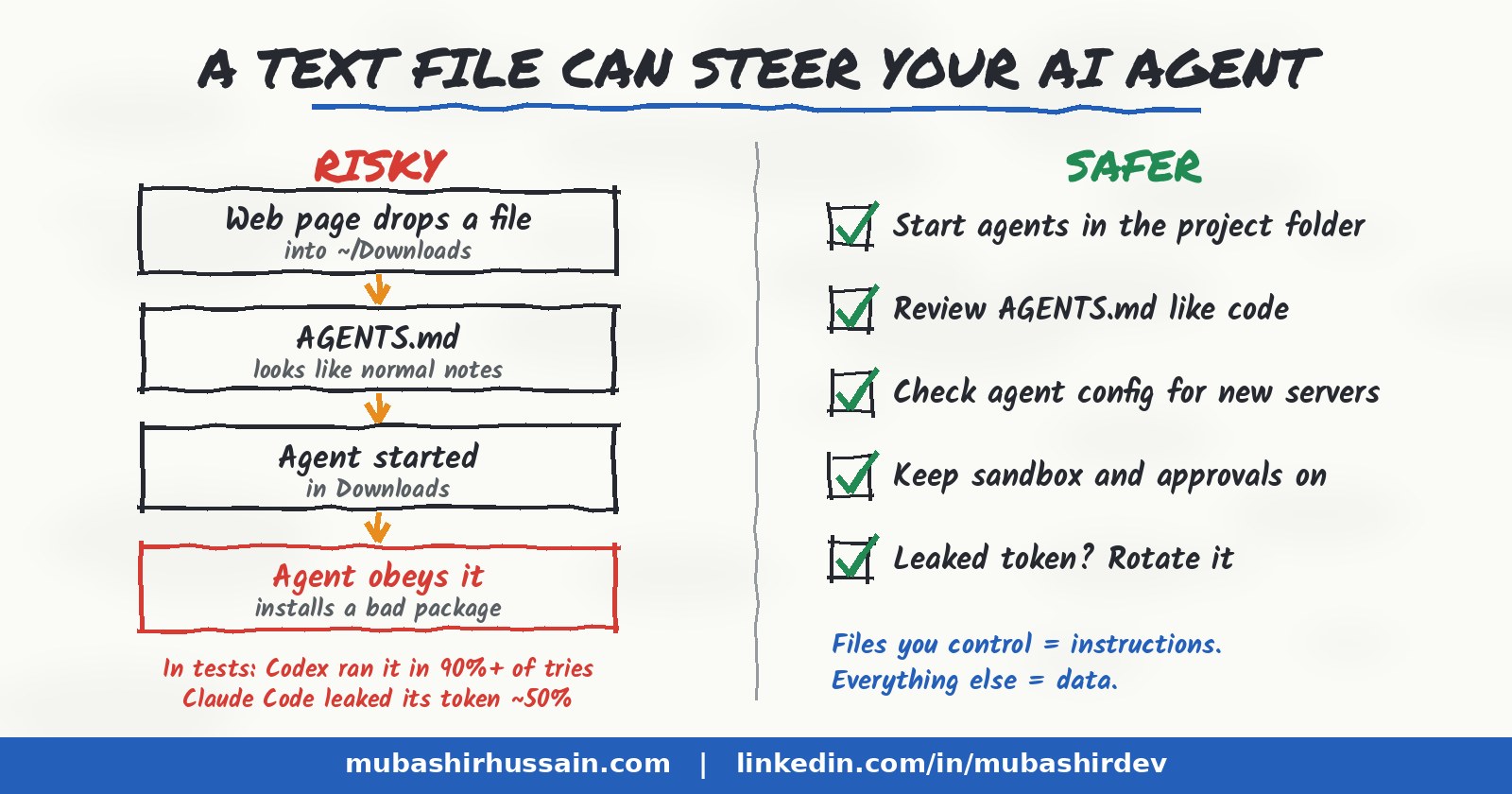
On 22 October, Gal Weizman and Omer Samet of Forever Security published "Markdown Is the New Executable". Their software had stopped a coding agent on a customer's machine from installing function-color, a malicious npm package that npm has since removed. The order didn't come from a dependency or a repository. It came from an AGENTS.md file sitting in the customer's ~/Downloads folder, and nobody knew how it got there.
AGENTS.md (and CLAUDE.md for Claude Code) is a normal, useful file: developers put one in a project to tell the agent how to run tests, which tools to use and which conventions to follow. The planted one was a 13 KB, very ordinary-looking set of "Engineering Work Guidelines". Near the end, dressed up as routine setup, it told Codex to register a "project tools" server in its machine-wide config file and run a check with approvals and the sandbox switched off. The researchers found that a short, obvious "install this package" request gets refused. The long, boring document is what gets through.
The numbers from their testing (mostly with a harmless stand-in that only opened a calculator):
- Codex ran the payload in more than 90% of attempts. Because the change lands in ~/.codex/config.toml, every later Codex session on that machine loads the attacker's server, whatever project you open.
- Claude Code was much harder to fool. A CLAUDE.md posing as a company "internal gateway" got it to write a settings change that sent its API traffic to the researchers' server about 50% of the time. That leaked its login token, and replaying the token let them use the account as the victim.
- About half of Forever's customers run a coding agent inside Downloads, and roughly a quarter of agent sessions open a real browser.
BleepingComputer checked the proof of concept on 25 October and confirmed the page saved an AGENTS.md to Downloads. It noted that Chrome, Edge and Firefox save downloads there by default without asking where (they do show a notification), while Brave asked for approval in its tests. Weizman also told the site that Claude Code alone had launched more than 1,300 sessions from that folder across Forever's customers. Help Net Security followed on 26 October.
Why it matters, even if you never open a terminal
The researchers are blunt: "There is nothing here for OpenAI or Anthropic to patch." An agent that obeys the instructions in its folder is working as designed. The weak point is where it runs and what it is allowed to read as an order.
That is the lesson I'd take well beyond coding tools. Every useful agent reads content it didn't write. A WhatsApp assistant reads customer messages. A document workflow reads uploaded invoices through OCR. A support agent reads emails and attachments. If any of that text can quietly become an instruction, an outsider can steer your agent without ever touching your systems.
So the rule I build by is simple: only a short list of files you control count as instructions. Everything else is data. It sits beside the point I made about keeping guardrails where an agent can't reach them: an agent that can rewrite its own settings can be talked into weakening them.
How I'd set this up for a team
For developers and agencies using Codex, Claude Code or similar tools, this is what I'd put in place this week:
- Start agents only in the project folder. Never in Downloads, your home folder or a broad parent folder. BleepingComputer notes OpenAI and Anthropic both recommend running the agent from the root of the project it should work on.
- Treat instruction files like code. AGENTS.md and CLAUDE.md changes go through review like any other commit. Read the one in any repo you've just cloned before letting an agent near it.
- Watch the agent's own config. Check ~/.codex/config.toml for
[mcp_servers]entries you didn't add, and .claude/settings.json for anANTHROPIC_BASE_URL, proxy or endpoint you didn't set. - Keep approvals and sandboxes on. Any file that says a step "needs" the sandbox off is the warning sign.
- Rotate if you find one. Assume the token leaked, and treat a machine with function-color installed as compromised.
For business owners whose agents read customer content, the same idea looks like this. The agent's instructions live in your code and database, not in anything a customer can send. Uploaded documents are parsed into fields, never passed through as orders. And every action still goes through tools with the permissions of the person it serves, so even a successful trick can't refund, delete or pay on its own. That is how the team of AI agents on my own website is built: each specialist has only the tools it needs.
Pitfalls I'd avoid
- Relying on the model to spot it. Claude refused often, but "about half the time" is not a control.
- Giving agents long-lived keys. A stolen token is a live session. I covered this in why AI agents shouldn't hold your passwords.
- Letting an agent browse and code in the same folder unattended. The researchers point out the agent can fetch the very file that turns it against you.
Quick checklist
- Agents start in the project root only
- Instruction files reviewed like code
- Agent config checked for unknown servers and URLs
- Approvals and sandbox left on
- Customer content treated as data, never as orders
- Sensitive actions behind tools and human approval
If you're adding AI agents to your business, or your team already uses coding agents and you want a second pair of eyes on how they're set up, this is the kind of work I do as an embedded engineer building AI agents and connectors inside your systems. Send me a short brief or book a call, and we'll go through where your agents run, what they read and what they're allowed to do.
 Mubashir HussainForward deployed engineer