For years, getting an answer out of an ERP meant knowing which screen to open, which report to run and who to ask when the numbers looked wrong. This week two of the biggest AI companies made it clear that the front door is moving. You will soon describe what you need in ChatGPT or Claude, and the assistant will go into your finance, sales or client systems to do the work.
That sounds like the end of the old business software. I think it's the opposite. The more an assistant can do, the more your existing system needs to stay the one that has the final say.
What happened
On 27 October, OpenAI announced an expanded partnership with Oracle to bring Oracle's applications and data into ChatGPT. The centrepiece is Oracle AI Workspace, which lets people describe a goal, find the right information and "complete approved business workflows in one place", with access "governed by each organization's permissions and approvals". OpenAI's example is a new finance team member using ChatGPT to investigate costs, understand purchasing decisions and see what remains before month-end close. Oracle is also launching an AI SMB Bundle that combines ChatGPT Business and Codex with Oracle applications for small businesses. OpenAI notes that Oracle itself has 130,000 active ChatGPT users and more than 95,000 active Codex users.
Oracle's own introduction to AI Workspace is the part I'd read twice. Its example is a customer order put at risk by a supplier delay: find an alternative product, check stock, validate transport, assess the financial impact and update the order. Workspace keeps track of the goal, but "Oracle applications validate business requirements and approvals and perform the authoritative work." Oracle also says information "can inform a recommendation without automatically triggering an action". AI Workspace is marked as coming soon, so this is a direction, not something you can switch on today.
The same day, Anthropic listed an update to Claude for Financial Advisors, which first launched in September and now carries more partner connectors. Claude can reach CRMs such as Wealthbox and Redtail (through Orion), custodians such as Charles Schwab, and portfolio and planning tools such as Addepar, Envestnet and MoneyGuide. The pattern is the same: Claude prepares briefs and drafts, and "stages administrative actions like CRM updates or draft client communications for the advisor's review and approval."
Why it matters
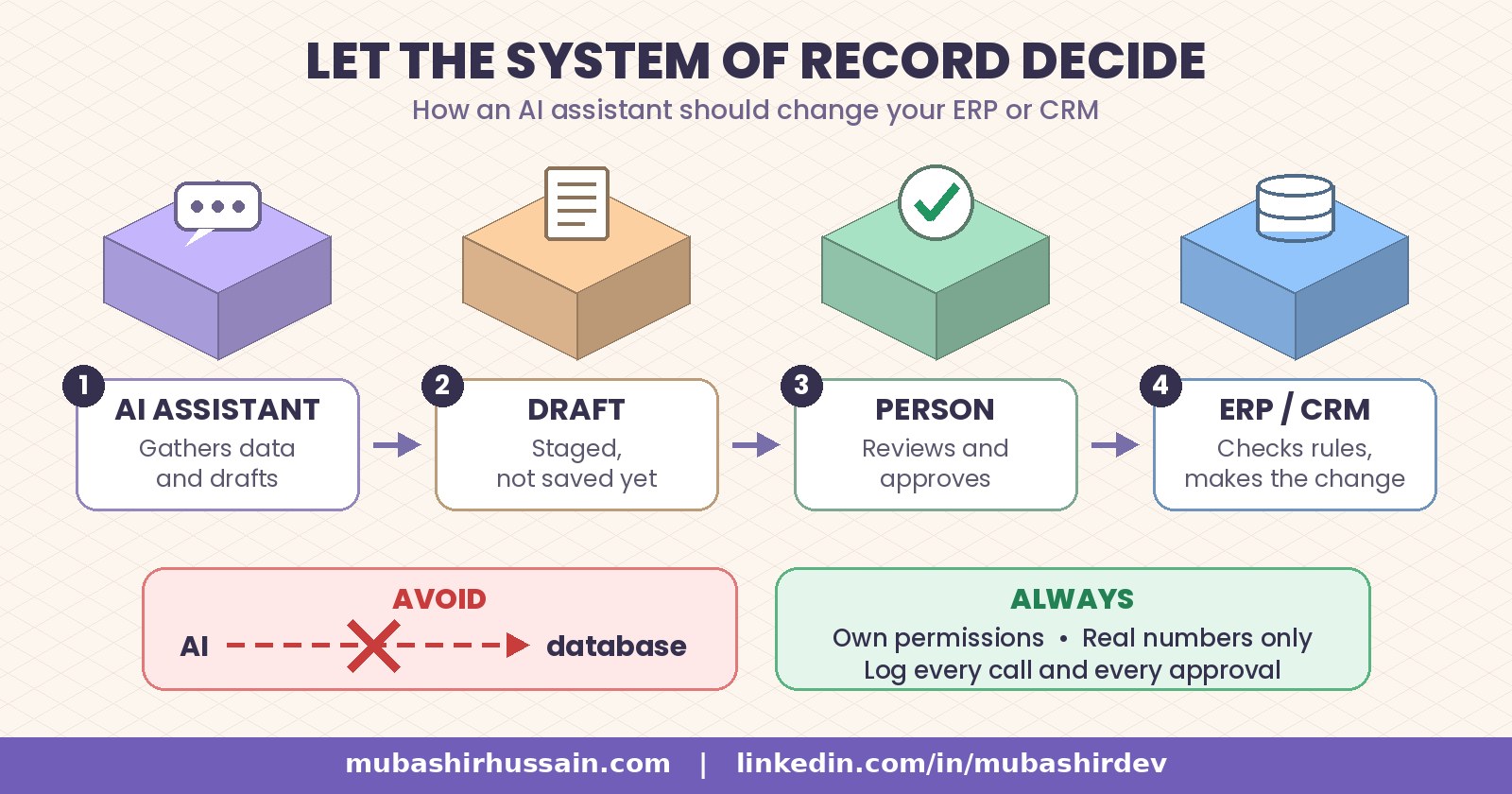
Two very different companies, one for enterprise ERP and one for small advisory practices, landed on the same design. The assistant gathers, reasons and drafts. The business system checks the rules and makes the change. A named person approves anything that matters.
That split is the whole game. When an AI writes straight into a database, your business rules quietly move out of the software that was built to enforce them and into a prompt. Credit limits, stock reservations, approval thresholds and tax logic were coded into your ERP or CRM for a reason. A prompt can't guarantee any of them.
It also means the quality of your records now matters more, not less. An assistant that pulls a client history from a CRM full of one-line notes will produce a thin brief, however good the model is.
How I'd connect an assistant to an ERP or CRM
Most of my work sits exactly here. I'm the lead developer on the platform a UK repair business runs its day on, where bookings, payments, invoices, repairs and trade-ins live in one system. When I connect an AI to a system like that, these are the rules I follow.
- Go through the system's own actions, not its tables. The connector should call the same functions your staff screens use, such as "create quote" or "reserve stock", so every validation still runs. If there is no clean action for something, build one before you give the AI access to it.
- Use the signed-in person's permissions. The assistant should see and change only what that employee can. Oracle and Anthropic both say this, and it's the first thing I check in any connector.
- Stage, then commit. Have the AI write a draft record (a draft invoice, a pending CRM note) that the system marks as unapproved. A person reviews it in the normal screen and the system commits it. I explained how I sort actions into free, confirm and never in which AI agent actions should need a human to approve first.
- Read numbers, never invent them. Prices, balances and stock must come from the system in that moment. On the team of AI agents on my own website, prices are never made up and messages only go out after the visitor confirms.
- Log every call with who asked for it. When something looks wrong at month-end, you need to know whether a person or an assistant made the change, and who approved it.
Pitfalls I'd watch for
- Matching the wrong record. Two customers with the same name is an everyday problem. Make the assistant confirm the exact record before it drafts anything against it.
- Approval fatigue. If every lookup needs a click, people start approving without reading. Keep approvals for writes that cost money, change records or speak for you.
- Shadow writes. Spreadsheets and side databases that the assistant updates but your ERP never sees. One system of record per type of data, always.
- Rules living in prompts. If a limit matters, enforce it in code where the assistant can't talk its way round it.
A short checklist before you connect
- List the five tasks your team repeats most in the ERP or CRM.
- Mark each one as read-only, draft-then-approve, or not allowed.
- Confirm the connector uses each person's own login and permissions.
- Check that every write goes through the system's validations.
- Clean up the records the assistant will read first.
- Test on sample data, then on a single team, before rolling it out.
If you want to see what this looks like in practice, my live sample agents show every tool call, confirmation and refusal on made-up data. And if you'd like an assistant connected to your own CRM, ERP or booking system the safe way, that is exactly the CRM, ERP and connector work I do as a forward deployed engineer.
Not sure where to start? Book a free call and we'll map which of your workflows an assistant should touch, and which ones your system should keep for itself.
 Mubashir HussainForward deployed engineer